
Telegram
The Tradiflux Telegram bot does three things:
- sends your notifications — fills, take-profits and stop-losses, price alerts, bot events, warnings;
- runs the AI assistant right in the chat — text, voice messages, screenshots and forwarded signals;
- opens the Mini App — Tradiflux inside Telegram.
Connect Telegram to your account
- In the web app open Settings → Integrations.
- In the Telegram card click Connect Telegram. The Tradiflux bot opens in Telegram.
- Tap Start. The bot replies ✅ Linked! You will receive trade notifications here.
- Go back to the settings page and click Refresh status. The card shows Connected, your username, the status and whether notifications are on.
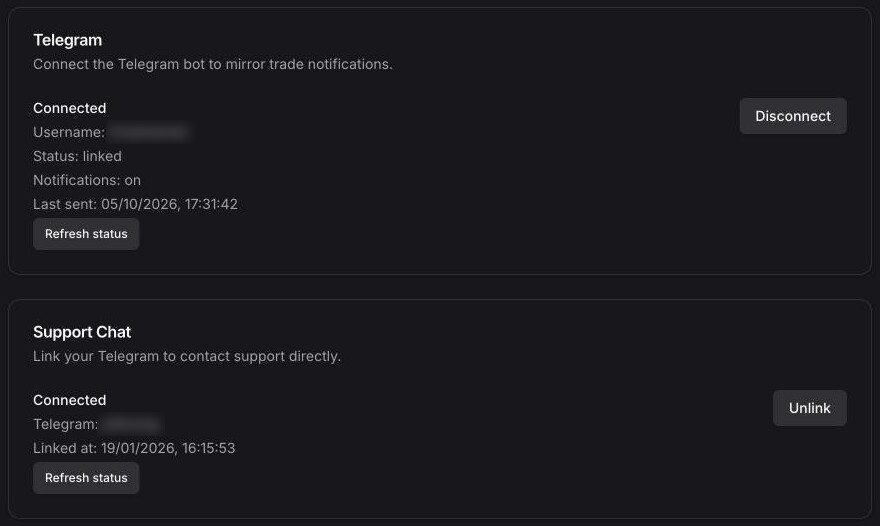
The link from Connect Telegram works for 10 minutes. If the bot says the token is invalid or expired, click Connect Telegram again.
One Telegram chat belongs to one Tradiflux account. Linking it to your account moves it away from any other account it was linked to. The only exception is an account created in Telegram that already has exchanges or deals: then the bot asks you to contact support to move it.
Sign up or sign in with Telegram
You can also use Telegram instead of a password:
- On the sign-in or sign-up page click Continue with Telegram.
- Open the bot (on a computer you can scan the QR code with your phone).
- The bot asks Sign in to Tradiflux in a browser? and shows the browser, the system and the IP address of the request.
- Press Sign in if it was you, or Decline if not. The browser signs you in.
If your Telegram is not linked to an account yet, the bot offers Open Tradiflux: create an account there, then press Sign in. Accounts with two-factor authentication sign in with email and password.
An account created through Telegram has no email. To sign in from other devices without Telegram, add an email and password in Settings → Security → Sign in with email.
Bot commands
| Command | What it does |
|---|---|
/start | Links the chat (when opened from Connect Telegram) or unmutes notifications |
/stop | Mutes notifications; the link stays |
/start_notifications | Unmutes notifications |
/status | Shows the link status, whether notifications are on and the username |
/unlink | Disconnects this chat from your account |
/new | Starts a new conversation with the AI assistant |
The Tradiflux menu button next to the message field opens the Mini App.
The AI assistant in the chat
Write to the bot in a private chat as you would in the web panel. It replies in the language you write or speak in. It needs the Basic plan, like the assistant in the app.
What you can send:
- Text — questions, trade requests, signal posts.
- Voice messages — up to 3 minutes. The bot first shows what it heard (🎙 …) so you can catch a misheard ticker or number. Transcription uses AI credits.
- Images — screenshots as photos or files, up to 5 MB each (JPEG, PNG, WebP or GIF). Albums arrive as one message.
- Forwarded posts — forward one or several posts from a signal channel together with your own comment ("take this on demo"). The bot answers them in one reply.
Proposals arrive as cards with inline ✅ Confirm and ✖️ Cancel buttons, a DEMO or ⚠️ REAL ACCOUNT badge, and the same 15-minute expiry as in the app. After a confirmed card the bot adds Open terminal or Open bots. Chart drawings come with 📈 Open in terminal (opens in the Mini App) and TradingView Advanced Charts.
/newstarts a fresh conversation. The Telegram chat and the web panel keep separate conversations.- If the chat is not linked yet, the bot replies with an Open Tradiflux button to sign in or create an account right in Telegram.
Everything the assistant can do is described in AI assistant.
Notifications
By default Telegram gets:
- Orders — order filled, take-profit and stop-loss triggered or executed, averaging order executed, averaging trigger limit placed;
- Smart orders — exited, archived, paused, resumed;
- Price alerts — price alert triggered;
- Bots — bot auto-stopped, bot can't trade, recurring buy executed and completed, grid level rearmed;
- Problems — order execution or validation failed, connection and API errors, trade execution error, margin call, liquidation warning, account suspended, API key expiring.
"Smart order closed" and "Bot archived" are off for Telegram by default. Messages come in your interface language. Most have an Open Terminal button that leads to the deal, the bot or the account the message is about. For a price alert it opens your terminal with the chart drawing the alert was set from, or the public chart of that market.
To change what you get, open Settings → Notifications: turn the Telegram column on or off per event, and pick the Bot notifications level for Telegram (Errors only, Important, All events). See Notifications.
To pause all messages, send /stop; to resume, /start_notifications or /start.
Mini App
Tap the Tradiflux menu button in the bot chat.
The first time, choose:
- Create an account — a new Tradiflux account signed in with Telegram, no email or password needed;
- I already have an account — tradiflux.com opens: sign in there and press Connect Telegram, then come back to Telegram.
After sign-in the Mini App opens the full Tradiflux app — terminal, bots, portfolio, settings — inside Telegram. Purchases are not available there: Settings → Billing says subscription management isn't available in Telegram, while your plan and AI credits work as usual. Buy plans and credits in a browser.
Where the full app can't keep you signed in (for example, Telegram in a web browser), the Mini App shows a compact version with three tabs:
- Portfolio — your accounts with equity, active deals with PnL, entry, price, take-profit and stop-loss, Close at market and Open in terminal. Without exchanges: Open a demo account (a demo perpetual account with virtual funds) or Connect an exchange.
- Agent — the assistant's latest trade proposals from the chat and the web, which you can confirm or cancel here too (the first decision wins). Back to the chat closes the Mini App.
- Account — Open Tradiflux in the browser (signs you in automatically). Accounts created in Telegram also get Add email and password and Use my existing Tradiflux account (moves this chat to your account with email).
Disconnect Telegram
Either:
- send
/unlinkto the bot, or - open Settings → Integrations and click Disconnect in the Telegram card.
Notifications stop, and the assistant in the chat no longer sees your account. You can connect again at any time with Connect Telegram.
AI assistant
Chat with the Tradiflux AI assistant about the market and your deals. It sets price alerts and draws charts right away; orders and bots only go out after you confirm them on a card.
Explore charts
Free TradingView Advanced Charts for Bybit, OKX, Bitget, BingX and Hyperliquid markets — multi-chart layouts, order book, a 30-day grid bot replay and a one-click handoff to the terminal. No sign-up needed.