
Hyperliquid
Tradiflux trades on Hyperliquid through an API wallet: a separate key you create on Hyperliquid that can place orders for your main wallet but can't withdraw funds. In the Add Exchange dialog there are two account types:
| Account type | What it trades |
|---|---|
| Hyperliquid Perpetual | Perpetual futures with USDC as margin |
| Hyperliquid Spot | Spot pairs against USDC |
On both you can use smart orders, price alerts, bots and the AI assistant. Recurring buy bots run on Spot only. Hyperliquid has no demo version in Tradiflux: to practise, use the Demo Exchange.
Create an API wallet
- Go to app.hyperliquid.xyz and connect your main wallet. A new wallet needs a USDC deposit on Hyperliquid first.
- Open More → API.
- Enter a name, for example Tradiflux, and click Generate. Give it a name: Tradiflux can warn you before an API wallet expires only if it has one.
- Click Authorize API Wallet, set the validity to 180 days (the maximum) and sign in your wallet.
- Copy the API wallet's private key right away: Hyperliquid shows it only once.
Add Hyperliquid to Tradiflux
- Click the exchange switcher in the header, then + Add.
- In Exchange, choose Hyperliquid Perpetual or Hyperliquid Spot.
- In Wallet Address, enter the address of your main wallet (
0xand 40 characters), not the API wallet's address. - In Private Key, paste the API wallet's private key (64 characters, with or without
0x). - Click Add.
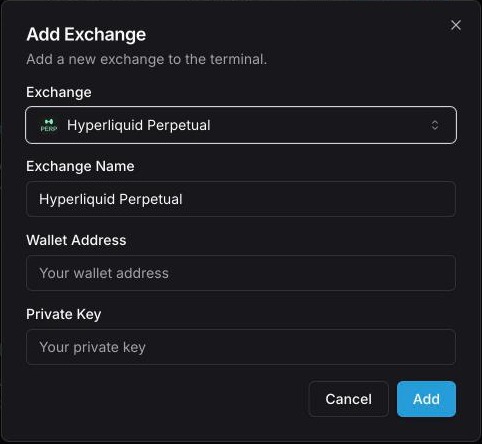
Never enter your main wallet's private key or seed phrase. To trade both perpetuals and spot, add two accounts with the same address and key.
If Tradiflux refuses the key
Tradiflux checks the pair with Hyperliquid before saving it. The most common messages:
| Message starts with | What's wrong |
|---|---|
| "This private key belongs to the wallet address you entered" | You entered the main wallet's key. Use the API wallet's key instead. |
| "Hyperliquid doesn't know this wallet as a trading account" | The address isn't your main Hyperliquid account, or the wallet has never had a deposit. |
| "This API wallet isn't authorized for the wallet address you entered" | The API wallet belongs to another address, wasn't authorized, or has expired. |
Subaccounts and vaults aren't supported.
Renew the API wallet
An API wallet works for 180 days at most. After that, every order on the account fails. Tradiflux reminds you:
- an API key expiring notification a week before, a day before and once it has expired;
- a banner in the app, from 7 days before: "…: the API key expires in N days. Create a new API wallet on Hyperliquid (More → API) and paste its key here, or orders on this account stop."
To renew:
- Create a new API wallet on Hyperliquid as described above.
- Click Edit keys in the banner, or the pencil next to the account in the exchange switcher.
- Enter your main Wallet Address again and paste the new Private Key. Both fields are needed.
- Click Update. The warnings start over for the new key.
Trading on Hyperliquid: what's different
- One position per coin. Hyperliquid perpetuals work in one-way mode: you can't hold a long and a short on the same coin at the same time.
- Whole-number leverage. Hyperliquid accepts 5x, not 5.5x.
- Market orders. Hyperliquid has no true market orders. Tradiflux sends an immediate-or-cancel limit order priced 5% beyond the current price for entries and 10% for closes and stop-losses, so it fills at the best prices available within that band and a stop still fills in a fast market.
- USDC. Margin and spot quotes are in USDC, and the exchange switcher shows your USDC balance.
- HIP-3 markets aren't supported. Markets created by builders under HIP-3 don't appear in the symbol list and can't be traded through Tradiflux.
- No builder fee. Tradiflux doesn't add a builder fee to your Hyperliquid orders.