
Recurring buy
A recurring buy places a market order on a spot account on a schedule: every N minutes, hours or days. The first order goes right away, and the next ones follow at the interval you choose. It doesn't take profit or sell what it bought. The coins stay on your spot balance. Use it to accumulate a coin over time or to sell a position in portions.
Recurring buys run on spot accounts only. On a perpetuals account the form shows "Spot accounts only"; switch to a spot account in the header.
Create a recurring buy
- On the Bots page, pick a spot account and the symbol in the header.
- Click New Bot and choose Recurring buy.
- Choose Buy or Sell.
- Set the interval under Every: a number and Minutes, Hours or Days.
- Set the Order size: In USDT (amount per order) or In BTC (quantity per order). The form names your symbol's real currencies.
- Optionally fill in Stop when.
- Read the line under it with the number of orders and the date of the last one, then click Start recurring buy.
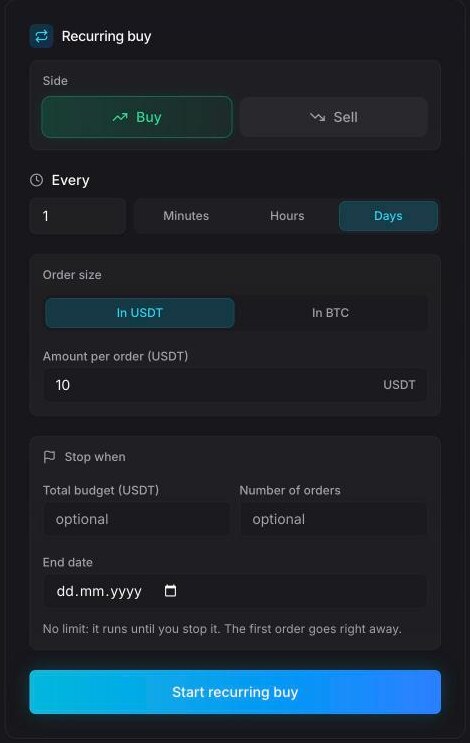
Fields
| Field | What it does |
|---|---|
| Side | Buy or Sell. A sell uses the coins on your spot balance. |
| Every | The interval: from 1 minute to once a year. Default: 1 day. Each order follows the previous one by this interval. |
| Order size | In USDT: Amount per order in the quote currency (default 10). In BTC: Quantity per order in the coin. |
| Total budget (optional) | Stop once this much quote currency has gone through the orders. The last order takes what is left. |
| Number of orders (optional) | Stop after this many orders. |
| End date (optional) | Stop at the end of this day. |
You can set several limits; the first one reached ends the recurring buy. Without any, the form says "No limit: it runs until you stop it. The first order goes right away." With a limit, it shows the plan: how many orders, for how much, and when the last one goes.
The amount per order and the budget must be at least the exchange's minimum order. If they are below it, the bot isn't created and you see the minimum. When the remaining budget drops below the minimum, the recurring buy completes.
What happens next
- Each order is a market order at the current price. You get a "Recurring buy" notification with the quantity, the price and the order count.
- When a limit is reached, the bot stops with Completed and sends "Recurring buy done": how many orders it made, how much it bought for how much, and the average price.
- In the bot's details, the Recurring buy block shows the side, the interval, Per order, Orders (done / total), Budget, Ends and Avg price. Runtime shows Executed runs, Last run and Accumulated (coins and quote currency).
Both notifications are on the Important level of bot notifications.
Stop a recurring buy
- Stop (No Deals) stops future orders. Start Bot resumes it. Once a recurring buy has reached its limit it can't be resumed: "This recurring buy is complete. Create a new one to keep buying."
- Stop & Archive moves it to History. It doesn't sell anything: every order of a recurring buy is complete once it fills, so the coins it bought stay on your balance.
Recurring buy or DCA bot?
A recurring buy ignores the price: same amount, same interval, no exit. The DCA bot reacts to the price: it buys more as the price falls, sells everything on a take-profit from the average entry and starts a new deal. Pick a recurring buy to build a position over months, and the DCA bot to trade swings.
DCA bot
A DCA bot with safety orders — base order, safety-order ladder, take-profit from the average entry, optional stop-loss, deal after deal. Every field, the ladder table, the backtest and a worked example.
Portfolio & Stats
See what you hold across all your exchange accounts on the Portfolio page, and your realized PnL, volume and fees by day on the Stats page.