
Smart orders
A smart order is one deal: up to 10 entry orders, one stop-loss (SL) and as many take-profits (TP) as you need. You fill in a single form; Tradiflux places the orders on the exchange, watches the price for the parts that the exchange can't do on its own, and keeps the SL and TP sizes in line with what has actually filled.
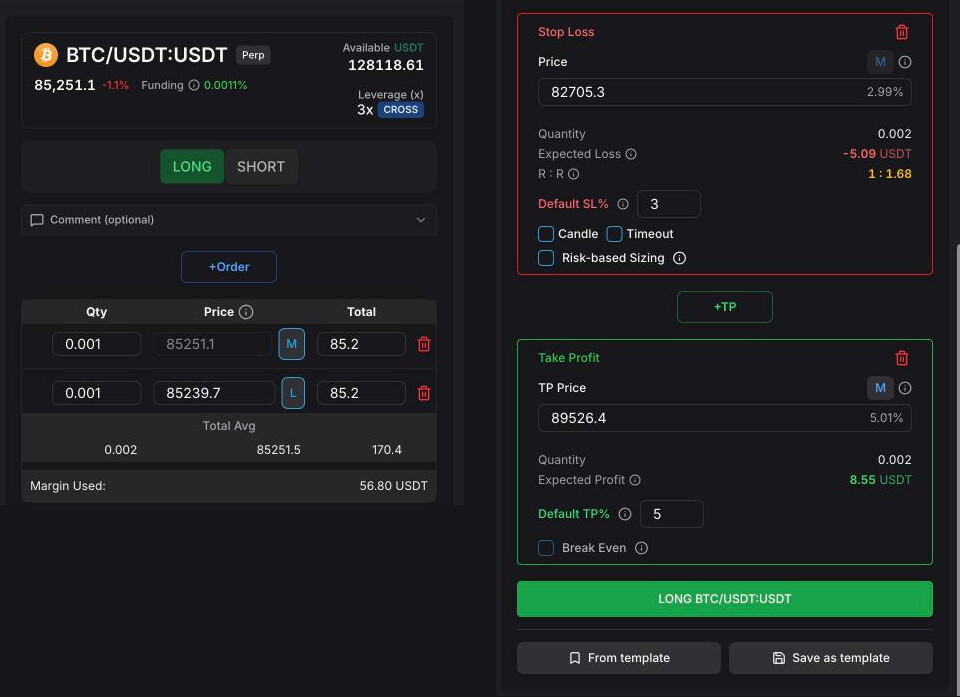
- Long / Short — direction of the deal (BUY / SELL on spot).
- Order type (M / L / TR) — market, limit or trigger entry.
- Price, quantity, total — set any of them, the others follow.
- Leverage — leverage and margin mode (perpetuals).
- +Order (averaging) — add another entry.
- +SL — add the stop-loss.
- +TP — add a take-profit.
- Risk / reward — the deal's risk-to-reward ratio.
Create a smart order
- In the terminal, click New Smart Order. The form opens on the current symbol; change the symbol in the header if needed.
- Choose LONG or SHORT. On spot accounts the buttons are BUY and SELL — SELL sells coins you hold, it doesn't open a short.
- Set the first entry: its type, Price and Quantity or Total.
- Optionally add averaging orders with +Order.
- Add a stop-loss with +SL and take-profits with +TP. Adjust prices in the fields or drag the lines on the chart.
- On perpetuals, check the leverage and margin mode in the card at the top of the form.
- Click LONG … / SHORT … (or BUY … / SELL …) at the bottom.
The deal appears in the Orders tab of the terminal. Its lines stay on the chart while it is open in the form.
You can also add an optional Comment (up to 280 characters). It shows in the orders list and the search there finds it.
Tip: The AI assistant can fill a smart order for you from a sentence or a screenshot of a signal. It shows a card, and nothing is placed until you click Confirm.
Entry and averaging orders
Every entry has a type button next to its price. Click it to cycle through:
- M — market. Fills at the best price as soon as the deal is created; the price field is locked.
- L — limit. Goes to the exchange order book at your price and fills at that price or better.
- TR — trigger. Opens a Trigger row: pick M or L for the order to send and enter a Trigger Price. Tradiflux watches the price and sends the order when it reaches the trigger — for a long, when the price is at or above the trigger; for a short, at or below it. That makes TR a breakout entry.
Click +Order to add another entry — this is how averaging works. A new entry starts as a limit at the current price with the smallest allowed quantity; set its price and size. A deal holds up to 10 entries in total, and at least one must stay.
With several entries the form turns into a table with Qty, Price and Total columns and a Total Avg row: the total size and the average entry price if every entry fills.
On perpetuals, the form also shows Margin Used (margin for all positions in this symbol on the account) and, with isolated margin, Est. Liq Price. A warning appears if an entry price lies beyond the estimated liquidation price.
Note: If a trigger has fired and placed a limit order that hasn't filled, and the price then moves back more than 2% past the trigger for an hour, Tradiflux cancels that limit order.
Stop-loss
Click +SL to add the stop-loss. A deal has one stop-loss.
- Always at market. When the stop price is reached the position is closed with a market order — there is no limit stop-loss.
- Where it is placed. On perpetuals, a plain stop-loss is placed on the exchange as soon as an entry fills. On spot, and for the Candle and Timeout options, Tradiflux watches the price and sends the market order itself.
- Default SL% — where a new stop-loss lands: this percentage below your lowest entry for a long (above the highest for a short). Default 2%. The percentage shown next to the SL price is measured from your average entry.
- Expected Loss — what you lose if the stop is hit.
Options under the stop-loss (pick one or none):
- Candle — the stop fires only when a candle of the chosen timeframe (1m, 5m, 15m, 1h, 4h, 1d) closes beyond the stop price. Wicks that come back inside the candle don't close you out.
- Timeout — the price has to stay beyond the stop for the number of seconds you set (default 60). If it comes back sooner, the timer resets.
The form won't let you submit a stop-loss on the wrong side: below all entries and take-profits for a long, above them for a short. It also warns if the stop lies beyond the liquidation price.
Risk-based sizing
For a new deal, tick Risk-based Sizing under the stop-loss and enter Risk (% of deposit) and Deposit (USDT). The form then sizes the entries so that hitting the stop-loss loses about that share of the deposit: risk amount = Deposit × Risk %, split equally across entries that haven't filled, each sized by its distance to the stop. Move the stop and the sizes update. The settings are saved for the account.
Take-profits
Click +TP to add a take-profit; click again for more.
- The first TP takes 100% of the position. When you add more, set what share each one closes in the % column. The shares must add up to 100% — otherwise the form shows an error and a Fix button that spreads them for you.
- Default TP% — where a new TP lands: this percentage above your highest unfilled entry for a long (below the lowest for a short). Each further TP is placed the same distance beyond the previous one. Default 5%.
- M or L for each TP. M (market): Tradiflux sends a market order when the price reaches the TP. L (limit): the TP sits on the exchange as a limit order.
- Expected Profit for each TP and Total Potential Profit for all of them, counting pending averaging orders too.
TP prices have to be above all entries for a long (below for a short).
Close by market — on a live deal, each TP that hasn't filled has this button. It closes that TP's share of the position at market right now.
Break Even
Tick Break Even (it needs at least 2 take-profits). After the first TP fills, Tradiflux moves the stop-loss to your average entry price — or places one there if the deal has no stop-loss. The rest of the position can then only close at a profit or flat. Once it has fired, the setting can't be changed.
Risk / reward
With a stop-loss and at least one TP, the stop-loss section shows R : R as 1 : x. It is green from 1 : 2, amber from 1 : 1 and red below that. The ⓘ next to it shows the entry, risk and reward in USDT, plus a forecast for when pending averaging orders fill.
Leverage and margin mode
On perpetual markets the card at the top of the form shows the leverage and margin mode for the symbol. Click it to open Update Leverage, pick the leverage and Cross or Isolated, and click Confirm. The setting is applied on the exchange immediately and is used by the deal. On some exchanges the margin mode can only be changed on the exchange website.
Templates
Below the submit button of a new order:
- Save as template — saves the form: side, leverage, entries, stop-loss and take-profits with their prices and sizes, Break Even. Give it a name and optionally a description. You can Lock to symbol, Lock to exchange account and Include comment.
- From template — pick a saved template to fill the form. A template locked to another symbol offers Switch & Apply. Prices and sizes are rounded to the market's precision.
Templates keep exact prices, so they suit setups you repeat on the same symbol. Rename or delete them from the same list.
Edit a live deal
Click a deal in the Orders tab. The form loads it, and its lines appear on the chart.
- Change prices and sizes of orders that haven't filled, add or remove entries, the stop-loss and take-profits, toggle Break Even.
- Drag the lines on the chart — see Trading terminal.
- Click Update Order to send the changes.
The side can't be changed. Filled orders are locked. A partly filled order shows Partially Filled with a Cancel remainder button that cancels the unfilled part.
Pause, resume, exit, archive
These actions are on each deal in the Orders tab and at the top of the form when a deal is open.
| Action | What it does |
|---|---|
| Pause | Cancels the deal's orders on the exchange — stop-loss and take-profits included — and stops automation. The position stays open. |
| Resume | Places the orders again and turns automation back on. |
| Exit | Closes the remaining position at market and cancels the deal's pending orders. Available once an entry has filled. |
| Archive | Cancels the deal's open orders and moves it to History. The position on the exchange is left as it is. |
Note: While a deal is paused, nothing protects the open position. A paused deal can still be edited (Editing enabled; placement suspended); the changes go to the exchange when you resume.
If Exit can't free enough balance because other orders on the exchange lock it, a dialog lists those orders and offers to archive the deal instead. Archive only cancels the deal's own orders; orders placed outside Tradiflux stay on the exchange.
Deal Cap
Deal Cap in the Orders tab limits how many smart orders can be in the market at once on this exchange account. A deal counts once it has a position or an entry order on the exchange. Enter 0 or leave the field empty for no limit.
When the cap is reached, new smart orders are saved as paused, and lowering the cap pauses deals that haven't entered yet. When a slot frees up, use Resume or Resume all on the Paused tab.
Automation paused
When you import a position from the exchange (Portfolio tab) and its stop-loss and take-profit orders don't cover the full position size, the deal is imported with Automation paused. Tradiflux then doesn't resize or re-place the exit orders.
The form shows the uncovered quantity and a Fix button that adjusts the stop-loss and take-profits to cover the position. You can also add or edit them yourself and click Update Order. Automation resumes once the exit orders cover the open position.
Plan limits
On the Free plan you can have up to 5 smart orders open at a time — active and paused ones count, closed ones don't. The Basic plan has no limit. See Account and billing.
Trading terminal
A tour of the Tradiflux terminal — header, symbol selector, chart and order lines, alerts on the chart, order book, portfolio and orders tabs, and the mobile layout.
Price alerts
Get notified in the app and in Telegram when a price crosses your level — set alerts in a dialog, straight from the chart or through the AI assistant, and move them by dragging.