
Grid bot
A grid bot trades a price range. It places a limit buy on every level of the range and sells each filled level one level higher. Every time the price swings between two neighbouring levels, the grid books the difference. It works best in a market moving sideways inside the range.
How a grid works
- Levels. Between Lower Price and Upper Price the bot places Total grids levels at an equal percentage from each other. The lowest level is the lower price and the highest is the upper price.
- A level is a limit buy at the level's price plus a limit take-profit at the next level up. The top level's take-profit sits one step above the upper price.
- Re-arming. When both the buy and the take-profit of a level have filled, the bot places that level again. You get a "Grid level rearmed" notification.
- Levels above the current price get limit buys too, so they fill almost at once. When you start a grid in the middle of its range, it buys about half of its levels right away. These are the coins it sells as the price goes up.
- Outside the range the bot waits. Below the lower price every level is bought and holds until the price comes back. Above the upper price every level is sold and nothing is bought until the price comes down. A grid has no overall stop-loss and doesn't stop when the price leaves the range.
Example. BTC is at 60,000. With an auto-range of ±10% and 20 grids, the levels run from 54,000 to 66,000, about 1.06% apart. With a total of 1,000 USDT, each level gets 50 USDT. Each completed cycle (buy at a level, sell one level higher) earns about 0.53 USDT before fees. The 10 levels above 60,000 are bought as soon as the bot starts.
Create a grid bot
- On the Bots page, pick the account and the symbol in the header.
- Click New Bot and choose Grid.
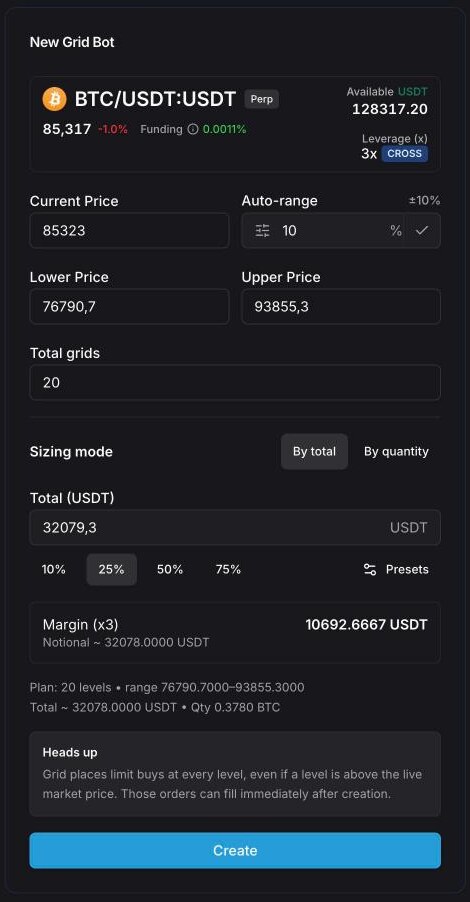
- Check Current Price, then set the range: type a percentage in Auto-range and press the check mark, or enter Lower Price and Upper Price yourself.
- Set Total grids.
- Choose the size: By total (in the quote currency) or By quantity (in coins).
- On perpetuals, check the leverage at the top of the form (see Leverage).
- Read the plan line and the warnings under the fields. Run a backtest if you like.
- Click Create.
Form fields
| Field | What it does |
|---|---|
| Current Price | Filled with the live price. Auto-range is centred on it. |
| Auto-range | ±% around the current price. Press the check mark to set Lower and Upper Price. Default 10%; your last value is remembered. |
| Lower Price | The lowest level. |
| Upper Price | The highest level. Must be above Lower Price. |
| Total grids | Number of levels, 1–300. Default 20; your last value becomes the new default. |
| Sizing mode | By total: the total in the quote currency (USDT, USDC…) is split equally between the levels, so lower levels buy a few more coins. By quantity: the same number of coins on every level. |
| Total | The grid's total size in the quote currency. The buttons under it fill it with a share of your free balance (10%, 25%, 50%, 75% by default). Presets lets you change these buttons (up to 5). |
| Quantity | The grid's total size in coins (By quantity mode). |
| Margin (x…) | Perpetuals only: the margin the grid needs at the chosen leverage, and its Notional (full position size). |
Leverage on perpetuals
The coin card at the top of the form shows the leverage your account has on the exchange for this symbol. The form uses that value. Click it to open Update Leverage, set Leverage (x) and the Margin Mode (Cross or Isolated), and press Confirm. The change is applied on the exchange right away.
If the exchange doesn't report the leverage, the card shows "Leverage unavailable" with a retry button, and the form falls back to 30x isolated. Check the Margin (x…) line before you press Create, and don't create the bot until the card shows the leverage you want.
When the bot starts, it sets its leverage on the exchange before placing levels. If the exchange refuses it, the bot places nothing and you get a "Bot can't trade" notification.
Note: A grid can hold every level at once (when the price falls through the whole range). At high leverage, the liquidation price of that full position can sit inside or near your range. Pick the leverage for the worst case, not for the first fills.
Plan summary and warnings
Under the fields the form shows the plan: "Plan: 20 levels • range …" and "Total ~ … • Qty …". The levels are also drawn on the chart (the GRID toggle). Watch for these messages:
- Order too small for the exchange — the smallest level is below the exchange's minimum order. Press Fix automatically to raise the total (or the quantity) just enough, or use fewer grids.
- Insufficient balance — on spot, the grid's total must be available in the quote currency; on perpetuals, the margin must be. Create stays disabled until it fits.
- Heads up (perpetuals) — some levels are above the live price, and their limit buys can fill right after creation.
Backtest a grid
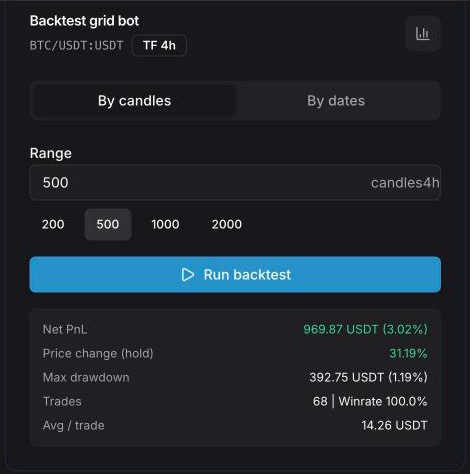
The Backtest grid bot card under the form replays the grid you've set up over the exchange's candles.
- Choose the timeframe on the chart. The card shows it as TF; the default is 4h.
- Pick the period: By candles (10–5,000 candles, buttons for 200, 500, 1000 and 2000) or By dates (From and To).
- Click Run backtest.
The results:
- Net PnL — profit in the quote currency and as a percentage of the grid's total, with levels still open at the end valued at the last price;
- Price change (hold) — how the coin itself moved over the same period, to compare with just holding it;
- Max drawdown — the deepest fall of the grid's equity;
- Trades and Winrate — completed level cycles and the share of profitable ones;
- Avg / trade — Net PnL divided by the number of trades.
The trades and the equity line appear on the chart (the BACKTEST toggle). The backtest charges a 0.06% fee on every fill and doesn't count funding. A level is filled when a candle touches its price. A backtest describes the past, not the future.
No account yet? The free grid bot backtest runs the same engine on any of 30+ coins on Bybit, OKX, Bitget, BingX and Hyperliquid, without signing up.
Spot and perpetuals
- Spot. The grid buys the coin with the quote currency and sells it one level higher. The whole total must be on your balance in the quote currency. There is no leverage.
- Perpetuals. The form creates a long grid: it opens longs on the levels and closes each one a level higher. Margin is the notional divided by the leverage. A short grid (it sells on the way up and buys back a level lower) can only be created through the AI assistant. There is no neutral mode.
On perpetuals, don't close the bot's position by hand on the exchange. The bot sees that the position shrank and stops itself (External position detected).
While the grid runs
Click the bot to see Grid config (range, center, grids, budget or quantity per level, leverage), Plan summary and Order feed. The settings can't be edited. To change them, click Create grid bot with these settings, adjust the copy and create it, then stop the old bot.
Stop a grid
- Stop (No Deals) — unfilled buys are canceled. Levels already bought keep their take-profits and sell as the price rises, but nothing is re-armed. You can Start Bot again later.
- Stop & Archive — everything the grid holds is sold (or its position closed) at market, its orders are canceled and it moves to History.
Details on both actions: Bots overview.
Tips
- Keep the current price inside the range. A wider range survives bigger moves but trades less often.
- More grids mean a smaller step between levels. Each step should stay well above the fees of a buy plus a sell.
- Run the backtest over a calm period and over a trending one, and compare Net PnL with Price change (hold).
- Try the grid on a demo account first.
See also
Bots overview
Grid, DCA bot and recurring buy — which one to pick, how to create one, and how to stop, archive and delete bots on the Bots page.
DCA bot
A DCA bot with safety orders — base order, safety-order ladder, take-profit from the average entry, optional stop-loss, deal after deal. Every field, the ladder table, the backtest and a worked example.