
DCA bot
The DCA bot buys a coin and averages down when the price falls. Each deal starts with a base order at market. Safety orders rest below it, and one take-profit follows the average entry price. Every filled safety order lowers the average, so the take-profit comes closer. When the deal closes, the bot opens the next one.
On perpetuals the bot can also go Short: it sells, adds as the price rises and takes profit below the average. On spot it only buys (Long).
Looking for a simple purchase every day or week? That's the Recurring buy.
How a deal works
- Base order — a market buy (a sell for a short) for the amount you set.
- Safety orders — limit orders below the entry (above it for a short). The first one sits First step % away. Each further gap is the previous one times Step scale, and each further order is the previous one times Size scale.
- Take-profit — one limit order at Take-profit % from the average entry. It moves after every safety fill.
- Stop-loss (optional) — Stop-loss % beyond the last safety order. It executes at market. When a deal closes on the stop-loss, the bot stops (Stop-loss hit) instead of buying straight back into the fall.
- Next deal — after the take-profit, the bot waits for the Pause between deals and opens a new deal at the current price, until it has made the number of Deals you set.
Create a DCA bot
- On the Bots page, pick the account and the symbol in the header.
- Click New Bot and choose DCA bot.
- On perpetuals, choose Long or Short and check the leverage on the coin card at the top of the form.
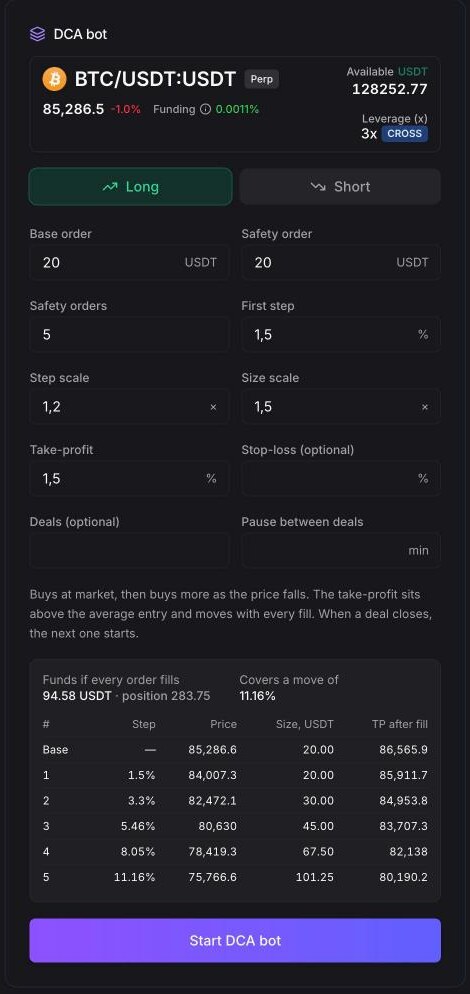
- Fill in the fields and read the ladder table under them.
- Run Backtest DCA bot if you like.
- Click Start DCA bot. The base order goes out right away.
Form fields
| Field | Range | Default | What it does |
|---|---|---|---|
| Long / Short | — | Long | Direction. Shown on perpetuals only; spot is always Long. |
| Base order | from 1 | 20 | Size of the market entry, in the quote currency. |
| Safety order | from 1 | 20 | Size of the first safety order, in the quote currency. |
| Safety orders | 0–25 | 5 | How many safety orders a deal has. With 0, the deal is the base order and a take-profit. |
| First step | 0.1–50% | 1.5% | Distance of the first safety order from the entry price. |
| Step scale | 1–3× | 1.2× | Each next gap between safety orders is this many times the previous one. |
| Size scale | 1–3× | 1.5× | Each next safety order is this many times larger than the previous one. |
| Take-profit | 0.1–100% | 1.5% | Distance of the take-profit from the average entry price. |
| Stop-loss (optional) | 0.1–99% | — | Distance of the stop-loss beyond the last safety order. |
| Deals (optional) | from 1 | — | Stop after this many closed deals. Empty means deal after deal until you stop it. |
| Pause between deals | 0–10,080 min | — | Wait this long after a deal closes before opening the next one (up to 7 days). |
Leverage (perpetuals) is set on the coin card at the top of the form. The form takes the leverage your account already has for this symbol. Click it to change the leverage and the margin mode; the change is applied on the exchange right away.
On a long, the safety orders can't reach zero. If they would, the form shows "The safety orders would reach below zero: lower the step or the count". When you start the bot, every order of the ladder is checked against the exchange's minimum order size. If one is too small, you get, for example, "Safety order 3 is below the exchange minimum".
The ladder table
Under the fields the form lays out a deal at the current price:
- Funds if every order fills — the base order plus all safety orders. With leverage, this is the margin, followed by the full position size.
- Covers a move of — how far the last safety order is from the entry, %.
- One row per order: # (Base, then 1, 2, …), Step (distance from the entry), Price, Size, and TP after fill — where the take-profit moves once this order fills.
- Stop-loss at … — the stop-loss price, if you set one.
Worked example
ETH/USDT at 2,000 with the default settings: base order 20 USDT, safety order 20 USDT, 5 safety orders, first step 1.5%, step scale 1.2, size scale 1.5, take-profit 1.5%.
| # | Step | Price | Size, USDT | Total, USDT | Average entry | TP after fill |
|---|---|---|---|---|---|---|
| Base | — | 2,000.00 | 20.00 | 20.00 | 2,000.00 | 2,030.00 |
| 1 | 1.50% | 1,970.00 | 20.00 | 40.00 | 1,984.89 | 2,014.66 |
| 2 | 3.30% | 1,934.00 | 30.00 | 70.00 | 1,962.75 | 1,992.20 |
| 3 | 5.46% | 1,890.80 | 45.00 | 115.00 | 1,933.96 | 1,962.96 |
| 4 | 8.05% | 1,838.96 | 67.50 | 182.50 | 1,897.70 | 1,926.16 |
| 5 | 11.16% | 1,776.75 | 101.25 | 283.75 | 1,852.70 | 1,880.49 |
- The full ladder needs 283.75 USDT and covers a fall of 11.16%.
- If ETH drops to 1,890.80, three safety orders fill and the deal holds 115 USDT. The take-profit moves to 1,962.96, so a bounce of about 3.8% from the low closes the deal with about 1.7 USDT of profit before fees.
- With Stop-loss 5%, the stop sits 5% below the last safety order, at about 1,687.91.
Backtest a DCA bot
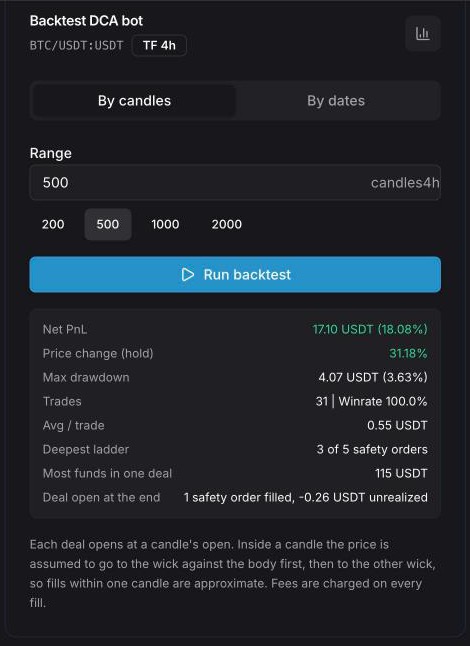
The Backtest DCA bot card under the form replays the bot over the exchange's candles. It uses the chart's timeframe (default 4h) and a period By candles (10–5,000) or By dates (From / To). Click Run backtest.
The results:
- Net PnL, Price change (hold), Max drawdown, Trades with Winrate, Avg / trade — the same as in the grid backtest;
- Deepest ladder — the most safety orders one deal used, out of the total;
- Most funds in one deal — the largest amount a single deal needed;
- Deal open at the end — how many safety orders the unfinished deal filled and its unrealized PnL.
If a deal hit the stop-loss, or the bot made all its deals, the backtest stops there and says so. Each deal opens at a candle's open. Inside a candle the price is assumed to go to the wick against the body first, then to the other wick, so fills within one candle are approximate. Fees are charged on every fill; funding isn't counted.
While the bot runs
Click the bot to see DCA settings: side, base order, safety orders ("5 × from 20 USDT"), first step, step and size scale, take-profit from average, stop beyond last order, leverage, Deals closed (for example "3 of 10") and the pause between deals. The settings can't be edited: stop the bot and create a new one.
Stop a DCA bot
- Stop (No Deals) — no new deal starts. A deal that is already open keeps its safety orders, take-profit and stop-loss and closes on its own.
- Stop & Archive — the open deal is closed at market, its orders are canceled and the bot moves to History.
A bot that has made all its Deals can't be started again; create a new one. More in Bots overview.
Tips
- Compare Covers a move of with how far the coin really falls. The backtest's Deepest ladder shows how deep the ladder actually went.
- Make sure Funds if every order fills is on your balance. A safety order that can't be placed doesn't protect the deal.
- On perpetuals, look at where liquidation sits relative to the last safety order and the stop-loss. A high leverage can liquidate the position before the ladder is used up.
- The take-profit must cover the fees of every fill in the deal. A very small take-profit with many fills leaves little profit.
DCA bot or recurring buy?
A DCA bot trades: it buys dips, sells on the take-profit and starts again. A Recurring buy only accumulates: a market order on a schedule, no take-profit, the coins stay on your balance.
See also
- Hyperliquid DCA Bot Setup Guide
- Tradiflux vs Veles — how our DCA bots compare to a dedicated DCA constructor
- Tradiflux vs 3Commas